









Your data engineering team is excited about Databricks serverless compute. Zero infrastructure management, instant startup, unlimited concurrency. They migrate everything to serverless.
Three months later, your monthly bill has tripled and your two-hour nightly ETL job that cost $16 on classic compute now costs $60 on serverless.
This is what happens when compute type gets chosen by default instead of by workload fit.
The choice between Databricks serverless vs classic compute isn’t about picking the better option. It’s about matching compute types to workload characteristics. Serverless excels at high-concurrency, short-duration queries where instant availability matters. Classic compute dominates for long-running jobs where you need resource control and predictable costs.
Use the wrong one and you’re either overspending on budget or throttling team productivity.
This guide provides the complete decision framework for choosing between serverless and classic compute, helping you maximize your Databricks investment while avoiding the most expensive mistakes.
Understanding Databricks Serverless vs Classic Compute
Databricks offers two fundamentally different compute models, each optimized for distinct workload patterns. Understanding these architectural differences helps you make better decisions about which compute type fits each use case.
Classic compute in Databricks operates on the traditional cluster model. You provision clusters with specific node types, configure autoscaling boundaries, and manage the infrastructure lifecycle. These clusters can be all-purpose clusters for interactive work or job clusters that spin up for specific tasks and terminate when complete.
Classic compute gives you complete control. CPU, memory, storage configuration, Spark settings. You can install custom libraries, tune performance parameters, and optimize resource allocation for your specific workloads.
Serverless compute represents a fundamentally different architecture. Databricks manages all infrastructure automatically. You don’t provision clusters, configure node types, or worry about scaling. Submit a query and serverless compute allocates resources dynamically, executes the work, and deallocates resources when finished. The entire infrastructure layer becomes invisible.
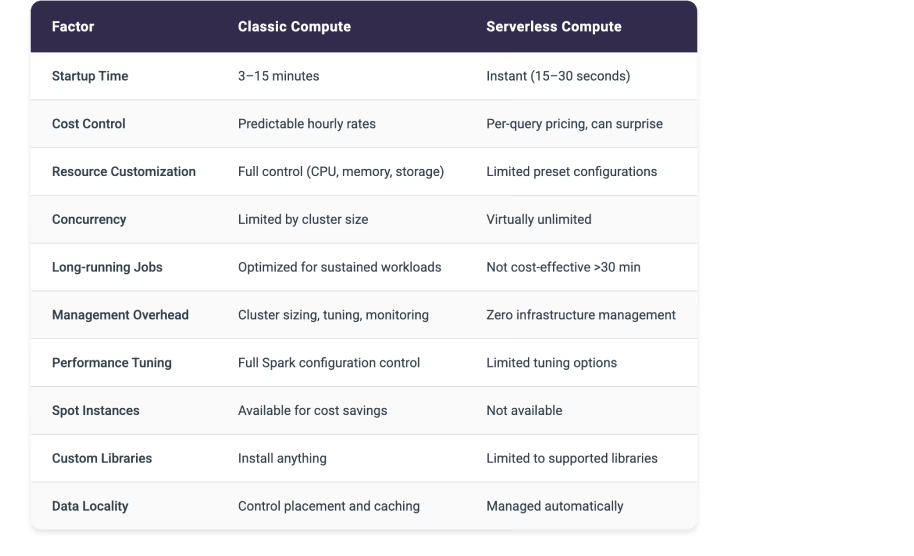
Startup time drops from five to twelve minutes for classic clusters down to fifteen to thirty seconds for serverless. This instant availability transforms the user experience for interactive workloads.
The resource allocation model differs dramatically between serverless and classic. Classic compute dedicates specific resources to your cluster for its entire lifecycle. An eight-node cluster consumes eight nodes worth of compute whether those nodes are processing data or sitting idle.
Serverless compute allocates resources per query. Execute ten concurrent queries and serverless automatically provisions whatever resources each query needs, scaling up and down seamlessly. This dynamic allocation enables virtually unlimited concurrency without pre-provisioning capacity.
Cost structures reflect these architectural differences.
Classic compute bills by cluster uptime. An eight-node cluster running for one hour costs the same whether it processes one query or one hundred queries. You pay for the time the cluster exists, not the work it performs.
Serverless compute bills per query execution time and data processed. A three-minute query processing one gigabyte of data incurs charges for those three minutes and that gigabyte. No charges accumulate when no queries are running.
Performance characteristics vary based on workload type. Classic compute optimizes for sustained, long-running workloads where you can tune Spark configurations, control data locality, and leverage cluster caching. A two-hour ETL job benefits enormously from persistent cluster state and optimized resource allocation.
Serverless compute optimizes for quick queries where setup time matters more than maximum throughput. A thirty-second dashboard query gets better total response time on serverless despite potentially lower per-query throughput.
The management overhead tells another part of the story. Classic compute requires decisions about cluster sizing, autoscaling boundaries, termination policies, and performance tuning. You monitor cluster utilization, adjust configurations based on workload patterns, and troubleshoot performance issues.
Serverless compute eliminates this operational burden entirely. No clusters to size, no configurations to tune, no utilization to monitor. Submit queries and let Databricks handle everything else.
Quick Decision Table for Databricks Serverless vs Classic
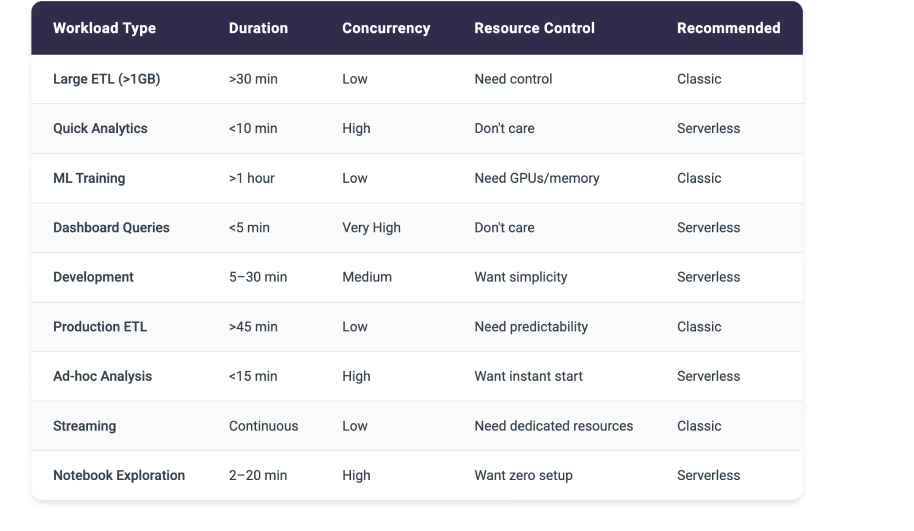
Clear Trade-offs Between Serverless and Classic Compute
[cta-banner]
When Databricks Classic Compute Makes Strategic Sense
Classic compute excels in scenarios where resource control, performance optimization, and cost predictability matter more than instant availability or zero management overhead.
Large datasets consistently point toward classic compute. Processing more than ten gigabytes regularly benefits from the sustained resource allocation and performance tuning that classic clusters provide. You can optimize memory allocation, configure shuffle partitions, and leverage data locality to maximize throughput.
A five-hundred-gigabyte daily ETL job needs the predictable performance and cost structure that classic compute delivers.
Long duration workloads naturally favor classic compute. Jobs running longer than thirty minutes minimize the impact of cluster startup time while maximizing the value of resource optimization. A two-hour ETL pipeline pays the five-minute startup cost once and then benefits from optimized cluster configuration for the entire execution.
The startup time represents just four percent overhead. Completely acceptable for sustained processing.
Resource-intensive workloads requiring specific CPU, memory, or storage configurations need classic compute. Machine learning model training often demands GPU instances with specific memory characteristics. You can’t get this level of resource control with serverless compute’s preset configurations. Classic compute lets you provision exactly the resources your workload needs.
Performance tuning requirements demand classic compute. When you need to optimize Spark configurations, adjust parallelism settings, or control memory allocation, serverless compute’s limited tuning options become a blocker. Complex analytics processing terabytes of data with intricate joins and aggregations needs the full configuration control that classic compute provides.
Custom environment requirements point decisively toward classic compute. Need a specific TensorFlow version? Custom Python libraries? Proprietary data processing tools? Classic compute supports installing anything. Serverless compute restricts you to supported libraries, which might not include your specialized requirements.
Predictable cost structures favor classic compute for some organizations. Knowing exactly what your hourly cluster costs will be simplifies budgeting and cost allocation. A dedicated eight-node cluster costs the same amount every hour regardless of query volume. This predictability helps teams manage budgets more confidently than serverless’s variable per-query pricing.
Streaming workloads require classic compute. Continuous processing twenty-four hours per day, seven days per week needs dedicated resources that remain allocated. Real-time streaming ingesting one hundred thousand events per second demands the sustained resource allocation and sub-second latency that only classic compute provides.
When Databricks Serverless Compute Transforms Operations
Serverless compute revolutionizes specific workload patterns where instant availability, zero management, and unlimited concurrency create transformative value.
Quick queries benefit enormously from serverless compute. When typical queries complete in under ten minutes, the instant fifteen to thirty second startup time of serverless compute beats classic compute’s five to twelve minute cluster initialization.
A thirty-second dashboard query gets results faster on serverless even accounting for slightly lower per-query throughput.
High concurrency scenarios showcase serverless compute’s architectural advantages. Fifty business analysts running unpredictable queries throughout the day would overwhelm a shared classic cluster or require expensive over-provisioning. Serverless compute scales dynamically to handle whatever concurrent query load arrives, providing consistent response times without capacity planning.
Simple workloads running standard SQL or Python without custom tuning fit serverless compute perfectly. When you don’t need to optimize Spark configurations or install specialized libraries, serverless compute’s preset configurations work great. Standard aggregations, joins, and transformations execute efficiently without manual tuning.
Zero administration requirements make serverless compute attractive for teams that want to focus on analysis rather than infrastructure. No cluster sizing decisions. No monitoring cluster utilization. No tuning autoscaling boundaries.
Data scientists and analysts can query data immediately without waiting for infrastructure setup or worrying about resource optimization.
Variable usage patterns favor serverless compute’s pay-per-use model. Sporadic, unpredictable workloads that might run five queries one day and fifty the next benefit from paying only for actual usage. A classic cluster sized for peak load wastes money during quiet periods. Serverless compute automatically scales up and down, charging only for work performed.
Development and exploration workloads thrive on serverless compute. Rapid prototyping, iterative testing, and experimental analysis need instant availability and zero setup friction. Data scientists exploring new datasets or testing analysis approaches want to run queries immediately without spinning up clusters or waiting for startup.
Cost per query preferences point toward serverless for certain patterns. When you prefer paying for actual work performed rather than cluster uptime, serverless compute aligns better with your cost model. Two hundred quick queries per day might cost significantly less on serverless than running a classic cluster for eight hours.
The 30-Minute Rule for Databricks Compute Selection
A simple guideline emerges from analyzing cost structures across thousands of workloads.
Jobs typically running longer than thirty minutes favor classic compute economics. Jobs completing in under thirty minutes often benefit from serverless compute’s instant availability and pay-per-use model.
Classic compute incurs a fixed startup cost of five to twelve minutes but then provides predictable hourly pricing. For a sixty-minute job, that startup represents just eight to twenty percent overhead. The remaining forty-eight to fifty-five minutes of execution benefit from classic compute’s optimized resource allocation and lower per-minute costs.
A two-hour ETL job on classic compute might cost sixteen dollars. That same job on serverless compute could cost sixty dollars due to higher per-minute processing rates.
Serverless compute eliminates startup time but charges higher per-minute rates for actual processing. For a five-minute query, saving five to twelve minutes of startup time provides massive value. The query completes in five minutes and fifteen seconds on serverless versus ten to seventeen minutes on classic.
Users get results three times faster. The higher per-minute cost matters less than the dramatic improvement in total response time.
The crossover point varies by specific workload characteristics, data volumes, and processing complexity. Thirty minutes serves as a useful initial guideline. Test both compute types with representative workloads to find your organization’s specific threshold.
Cost Impact Examples for Serverless vs Classic
Classic Compute for Development Team:
Four nodes at two dollars per hour equals eight dollars per hour. Six hours per day of active work costs forty-eight dollars daily or one thousand fifty-six dollars monthly for twenty-two workdays.
But if that cluster runs twenty-four hours per day, seven days per week:
- Daily cost: one hundred ninety-two dollars
- Monthly cost: five thousand seven hundred sixty dollars
- Waste: four thousand seven hundred four dollars (eighty-one percent waste)
Serverless Compute for Same Development Team:
- Two hundred queries per day, averaging three minutes each, processing roughly one gigabyte per query at approximately fifty cents per query hour
- Daily cost: approximately five dollars
- Monthly cost: one hundred ten dollars for twenty-two workdays
- Savings versus twenty-four seven classic: ninety-eight percent
Long-Running Job Comparison:
Two-hour ETL on serverless: two hours times higher per-minute rates equals approximately sixty dollars per run
Same job on classic: eight dollars per hour times two hours equals sixteen dollars per run
Classic wins decisively for sustained processing.
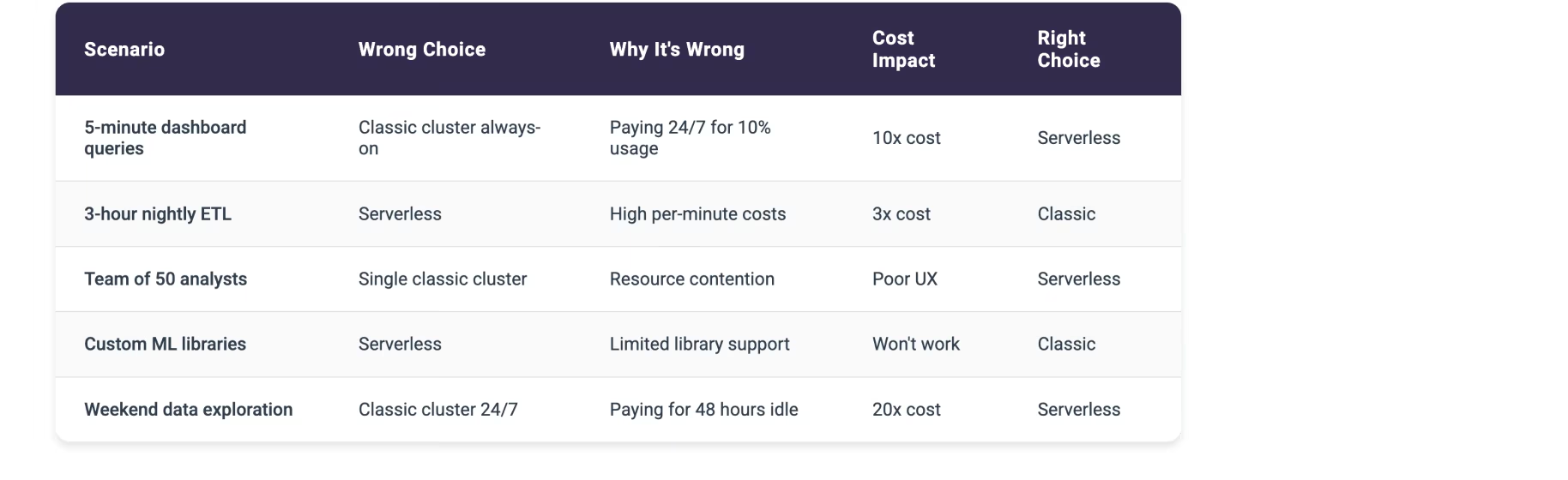
Common Mistakes with Databricks Serverless vs Classic
These wrong compute choices create the most expensive waste:
How to Actually Migrate from Classic to Serverless
Once you’ve identified a workload that fits serverless’s profile using the criteria above, the migration itself is where good decisions can still go wrong. A workload that looks like a great fit on paper can still break, slow down, or get more expensive if the move isn’t handled carefully. Four questions matter most during the transition.
What code or config actually needs to change for this workload?
Serverless removes the tunable cluster level settings classic compute relies on, so any job using custom Spark configurations, init scripts, or specific instance types needs a compatibility check first. Test the actual job logic against serverless before assuming it will run as is.
Is this a good low risk candidate to migrate now, or should it wait?
Start with workloads that run quickly, have unpredictable volume, and don’t depend on a custom environment build. These see the clearest wins from serverless’s pay per use model and instant startup. Save longer running jobs, heavily tuned jobs, or jobs tied to a specific environment for later, or keep them on classic entirely.
Did the last change introduce new inefficiency?
Migrations rarely fail all at once. A job can pass initial testing and still develop a problem weeks later as data volume or query patterns shift. Check runtime and cost again after the first few production runs, not just at go live.
Is anything this workload depends on going to break?
Downstream jobs, dashboards, or scheduled triggers that assume a certain runtime or output timing can break quietly when the underlying compute type changes. Map dependencies before migrating, not after something downstream fails.
This is exactly the kind of ongoing verification manual migration processes tend to skip, and where Unravel’s FinOps Agent adds visibility instead of assuming a migration went as planned.
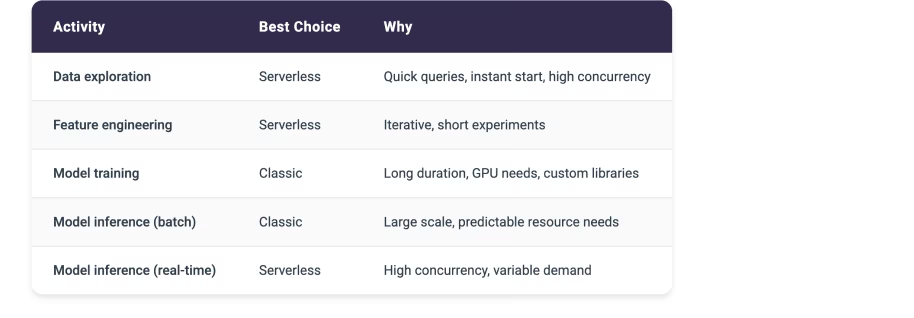
Detailed Use Case Breakdown
Data Science Teams
Business Intelligence
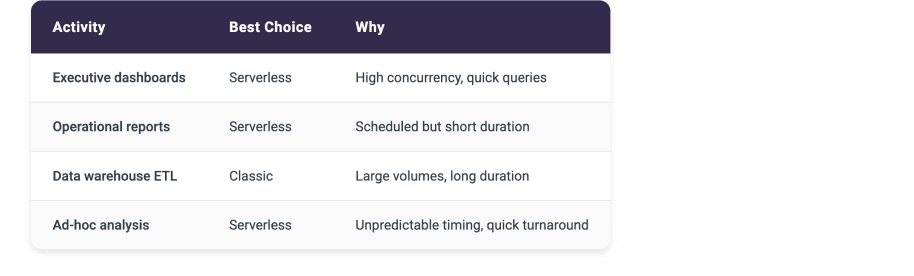
Data Engineering

The Hidden Complexity of Enterprise-Scale Compute Management
Managing Databricks compute at enterprise scale introduces operational opportunities that benefit from additional intelligence beyond what standard Databricks monitoring is designed to provide. Databricks excels at infrastructure-level metrics, cluster performance data, and providing powerful compute options.
Teams often benefit from a complementary layer focused specifically on automated cost optimization patterns and workload-to-compute-type matching.
Cost tracking becomes complex when different teams use different compute types or when workloads shift between serverless and classic based on characteristics. Databricks provides comprehensive cost reports showing spending by compute type. Organizations often need an additional analytical layer to identify workloads running on the wrong compute type, quantify the waste, and automatically migrate workloads to the optimal compute type.
The challenge intensifies when teams make inconsistent decisions about compute type selection:
- Your data science team might run all workloads on serverless for simplicity, including expensive long-running jobs better suited to classic compute
- Your data engineering team might provision classic clusters for everything, wasting money on idle time for occasional quick queries
- Marketing analytics runs weekend reports on always-on classic clusters, burning budget for forty-eight hours of idle time
- Finance provisions separate classic clusters for each monthly report instead of using serverless for these sporadic workloads
Without centralized visibility and consistent decision frameworks, these inefficiencies compound into substantial unnecessary costs.
Workload patterns change over time, creating opportunities for compute optimization. A job that starts as a fifteen-minute prototype evolves into a one-hour production pipeline but continues running on serverless compute. The job still works perfectly, but as characteristics change, teams often need additional intelligence to identify when workload evolution creates opportunities for cost optimization through compute type migration.
The problem multiplies across hundreds or thousands of workloads. Manually analyzing each workload to determine optimal compute type becomes impossible at scale. You need intelligence that continuously evaluates every job execution, compares actual characteristics against compute type decision criteria, and identifies optimization opportunities automatically.
How Unravel’s FinOps Agent Provides Intelligence for Compute Decisions
Unravel’s FinOps Agent complements Databricks by providing an actionable intelligence layer specifically designed for compute cost optimization and workload-to-compute-type matching. Built natively on Databricks System Tables using Delta Sharing, the FinOps Agent requires no agents or connectors to deploy, providing secure access to your Databricks metadata without any infrastructure to manage.
It continuously analyzes every workload execution pattern and implements optimizations based on your governance preferences.
The FinOps Agent moves beyond traditional observability tools that simply flag issues and leave implementation entirely manual. When the agent identifies that a long-running ETL job is significantly overspending on serverless compute, it doesn’t generate another dashboard alert. It implements the migration to classic compute automatically based on your governance preferences.
You control the automation level:
- Start with recommendations requiring manual approval to build confidence
- Enable auto-approval for specific optimization types like migrating workloads over thirty minutes to classic compute
- Progress to full automation with governance controls for proven optimizations like moving short queries to serverless
Organizations using Unravel’s FinOps Agent achieve twenty-five to thirty-five percent sustained cost reduction on their Databricks spending. That translates to running fifty percent more workloads for the same budget or reallocating hundreds of thousands of dollars from wasted compute to productive data initiatives.
The FinOps Agent specifically addresses compute type mismatch by identifying workloads running on the wrong compute type, quantifying the cost impact, and recommending or implementing the optimal compute type selection.
The FinOps Agent operates continuously and autonomously, unlike traditional monitoring tools that require manual review of dashboards and manual implementation of every optimization. When a workload’s duration consistently exceeds thirty minutes on serverless, the agent doesn’t wait for someone to notice and take action. It automatically migrates the workload to classic compute based on your governance rules, immediately reducing costs by sixty to seventy percent for that workload.
Check out our full Databricks Serverless Compute: The Platform Owner’s Guide to Making Better Serverless Decision
Start Your Databricks Serverless Journey with Intelligence
The path to successful Databricks serverless adoption begins with understanding your current state. Unravel offers a free Databricks Health Check that provides a comprehensive analysis of your Databricks environment, including:
- Current inefficiency identification across your workload portfolio
- Databricks serverless readiness assessment for your specific use cases
- Cost-performance modeling for potential serverless migration scenarios (preventing expensive surprises like 234% cost increases)
- Immediate Databricks cost optimization opportunities that can reduce costs regardless of infrastructure choices
Don’t let the Databricks serverless promise become a costly reality. Request your free Databricks Health Check today and discover how data-driven workload intelligence can optimize your Databricks investment. Whether that future includes serverless, traditional clusters, or the hybrid approach that most enterprises ultimately adopt.
Ready to move beyond guesswork? Contact our team at sales@unraveldata.com or visit our Databricks Optimization page to learn more about how Unravel’s native Databricks integration can transform your data platform economics.