









Your Snowflake costs jumped 40% last month. You check the usage reports and find warehouses running at 15% utilization, burning credits around the clock. The culprit? Warehouse sizing that doesn’t match what you actually need.
Snowflake’s virtual warehouses give you incredible flexibility – X-Small through 6X-Large, each with different compute resources and credit consumption rates. That flexibility is one of Snowflake’s greatest strengths, enabling teams to match compute power precisely to workload requirements. But it also means poor sizing decisions silently drain budgets while delivering minimal performance benefits. Get warehouse sizing right and you can reduce costs by 30-70% while maintaining or improving query performance.
Here are five smart tactics to optimize your approach.
1. Match Warehouse Size to Query Complexity and Data Volume
Not every query needs a Large or X-Large warehouse. Understanding what your queries actually need is where effective warehouse sizing starts. Snowflake’s architecture scales compute resources linearly with warehouse size – each size up doubles the virtual warehouse nodes and the credit consumption rate. Simple operational queries don’t need massive warehouses.
-- These don't need a Large warehouse
SELECT COUNT(*) FROM orders WHERE status = 'pending';
SELECT * FROM customers WHERE customer_id = 12345;
UPDATE inventory SET quantity = 50 WHERE product_id = 'ABC123';
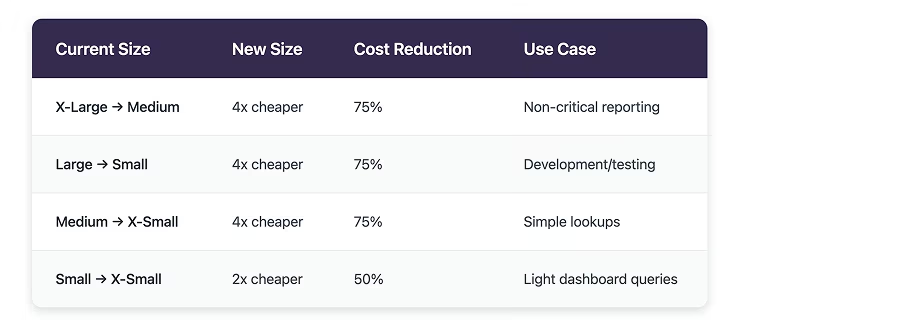
Queries scanning less than 1GB run efficiently on X-Small or Small warehouses. Operations on dimension tables, lookup tables, and dashboard queries pulling pre-aggregated data complete in seconds without requiring larger configurations. The cost impact of over-provisioning adds up fast – running dashboard queries on an X-Large warehouse (16 credits/hour) when they complete in 5 seconds creates massive waste. With 50 queries daily totaling just 4 minutes of actual compute, you’re burning credits for 23 hours and 56 minutes of idle capacity.
Move those same queries to a Small warehouse (2 credits/hour) and runtime increases to 8 seconds per query. Still perfectly acceptable for dashboard refresh cycles.
The cost savings? 87% reduction.
Small dataset operations benefit from smaller warehouses because queries scanning dimension tables, performing lookups on reference data, or pulling pre-aggregated metrics don’t leverage the parallel processing of larger warehouses. Snowflake’s micro-partition architecture optimizes data scanning regardless of warehouse size, so smaller warehouses handle these workloads efficiently through partition pruning and result caching. Development environments particularly benefit from downsizing – a Medium warehouse running 2-3 hours daily for sporadic dev/testing consumes 12 credits daily (4 credits/hour × 3 hours), while an X-Small warehouse handles the same development queries adequately at just 3 credits daily. Queries take slightly longer, but the 75% cost savings proves worthwhile when development speed isn’t critical.
Low-concurrency workloads rarely justify large warehouses:
- Single-user development environments
- Scheduled jobs that don’t overlap
- Infrequent reporting queries
These perform adequately on smaller configurations. Find the minimum viable warehouse size that meets your performance requirements while maximizing cost efficiency.
2. Implement Workload Separation with Dedicated Warehouses
Mixing development queries, production ETL, and user-facing analytics on a single warehouse leads to problems. Either you over-provision (paying for capacity you don’t need) or you under-provision (creating performance bottlenecks and query queuing).
One of the most effective optimization strategies involves creating dedicated warehouses for different workload types. The workload separation approach creates purpose-built warehouses:
-- Create different warehouses for different workload types
CREATE WAREHOUSE dev_wh WITH
  WAREHOUSE_SIZE = 'X-SMALL'
  AUTO_SUSPEND = 60;

CREATE WAREHOUSE reporting_wh WITH
  WAREHOUSE_SIZE = 'MEDIUM'
  AUTO_SUSPEND = 300;

CREATE WAREHOUSE etl_wh WITH
  WAREHOUSE_SIZE = 'LARGE'
  AUTO_SUSPEND = 60;
Development and testing workloads rarely require large warehouses, so the X-Small configuration handles SQL query iteration, transformation testing on sample datasets, and pipeline debugging adequately. Queries take slightly longer during development, but the 4-8x cost savings across development teams add up significantly when development speed isn’t business-critical. Production ETL pipelines benefit from dedicated Large warehouses that suspend aggressively – the 60-second auto-suspend setting ensures the warehouse shuts down immediately after job completion, letting batch processing jobs running during off-hours utilize this compute power without the cost concerns of keeping warehouses running continuously between jobs.
User-facing analytics and reporting need Medium warehouses with longer auto-suspend periods (300 seconds or 5 minutes). This configuration keeps the cache warm for frequently accessed data while still suspending during extended idle periods like lunch breaks or after business hours.
Balance maintains responsive query performance without burning credits unnecessarily.
Operational queries and simple lookups deserve their own X-Small warehouses. Single-row SELECT statements, inventory checks, and customer record lookups complete in milliseconds regardless of warehouse size, so running these on oversized warehouses wastes credits without meaningful performance benefits.
The cost implications become clear when you analyze actual usage patterns. A single Medium warehouse serving all workloads might run 24/7 at 4 credits per hour – that’s 2,880 credits monthly. Separating into specialized warehouses (X-Small for dev, Small for analytics, Large for ETL running 2 hours nightly) typically reduces total consumption to under 1,000 credits while improving overall performance and user experience.
3. Leverage Time-Based Scaling for Variable Workload Patterns
Warehouse sizing shouldn’t remain static when your workload patterns vary throughout the day, week, or month.
Snowflake’s ability to resize warehouses instantly enables dynamic configuration that matches compute capacity to actual demand. Many analytics workloads follow predictable patterns – business hours generate heavy query volume as analysts explore data and dashboards refresh, while evenings and weekends see minimal activity beyond scheduled batch jobs. Maintaining a Large warehouse 24/7 for workloads that only justify that size during peak hours wastes thousands of credits monthly.
Time-based scaling adjusts warehouse sizes based on usage patterns:
-- Scale down during off-hours
-- Peak hours: Medium
ALTER WAREHOUSE analytics_wh SET WAREHOUSE_SIZE = 'MEDIUM';

-- Off hours: Small
ALTER WAREHOUSE analytics_wh SET WAREHOUSE_SIZE = 'SMALL';
Scale warehouses up during peak business hours (9 AM to 5 PM) to handle concurrent users and complex queries without performance degradation. A Medium warehouse during these hours provides responsive query performance for analysts and dashboard users. Outside business hours, scale down to Small or even X-Small for the minimal activity that occurs.
Consider a reporting warehouse that supports business users. During business hours (8 hours daily), a Medium warehouse (4 credits/hour) handles peak load, while overnight (16 hours), an X-Small warehouse (1 credit/hour) covers minimal activity. This strategy consumes 48 credits daily (32 + 16) versus 96 credits for running Medium continuously – a 50% cost reduction that maintains full performance during business hours while eliminating waste during low-activity periods.
Batch processing particularly benefits from time-based scaling.
ETL jobs that run overnight can utilize Large or X-Large warehouses to complete quickly, then immediately suspend. Total credit consumption remains lower than keeping a Medium warehouse running continuously, and processing completes faster too. The resize operation takes seconds and doesn’t interrupt running queries – existing queries continue on the current warehouse size while new queries utilize the updated configuration, enabling seamless scaling and aggressive optimization without disrupting user experience.
Automated scheduling using Snowflake’s task framework can implement time-based scaling without manual intervention. Tasks execute ALTER WAREHOUSE commands to resize based on time of day, day of week, or business calendar events. Automation ensures warehouse sizing stays aligned with actual workload patterns consistently.
4. Monitor Utilization Patterns to Identify Over-Provisioning
Continuous monitoring of actual resource utilization drives effective warehouse optimization. Many organizations discover they’re running warehouses far larger than necessary simply because no one checked whether the provisioned capacity aligns with actual usage.
Snowflake’s WAREHOUSE_LOAD_HISTORY provides critical insights:
-- Query to see warehouse usage patterns
SELECT warehouse_name,
       AVG(avg_running) as avg_queries_running,
       AVG(avg_queued_load) as avg_queue_depth,
       COUNT(*) as query_count
FROM snowflake.account_usage.warehouse_load_history
WHERE start_time >= CURRENT_DATE - 7
GROUP BY warehouse_name;
The avg_running metric shows how many queries typically execute concurrently on a warehouse.
Values consistently below 2-3? That indicates over-provisioning. The warehouse has more compute resources than your workload requires, and avg_queued_load values near zero confirm queries aren’t waiting for resources. No queuing even during peak times suggests the warehouse sizing exceeds actual needs.
Monitor query performance patterns to identify downsizing opportunities:
- Most queries finishing in less than 10 seconds with resources to spare
- CPU utilization consistently low across query executions
- No memory pressure or disk spilling
- No queuing during business hours
Review query profiles for additional signals by looking for queries with low percentage scanned from cache and checking if parallelism is being fully utilized. Identify queries that complete well under SLA requirements. These patterns reveal where configuration could be optimized without impacting performance.
[cta-banner]
5. Optimize Auto-Suspend Settings to Eliminate Idle Costs
Even perfectly sized warehouses waste credits if they remain running during idle periods.
Optimization extends beyond selecting the right warehouse size to ensuring warehouses only consume credits when actively processing queries. Snowflake’s auto-suspend feature automatically shuts down warehouses after a specified period of inactivity, but the default setting of 600 seconds (10 minutes) proves too conservative for most workloads. Since Snowflake bills a minimum of 60 seconds whenever a warehouse starts, more aggressive auto-suspend settings rarely impact costs negatively while eliminating substantial idle time waste.
-- Reduce auto-suspend time for smaller warehouses
ALTER WAREHOUSE small_wh SET AUTO_SUSPEND = 60;  -- 1 minute
ALTER WAREHOUSE dev_wh SET AUTO_SUSPEND = 30;    -- 30 seconds
For development and testing warehouses, auto-suspend of 60 seconds works well because developers submit queries sporadically with gaps between iterations. The warehouse suspends quickly after each query completes, then resumes in seconds when the next query arrives. The brief startup delay? Negligible compared to the credit savings from not running idle warehouses continuously.
ETL and batch processing warehouses should suspend immediately after job completion. Setting auto-suspend to 60 seconds ensures the warehouse shuts down as soon as the last query finishes. Since these workloads typically involve scripted jobs rather than interactive queries, startup time on subsequent runs doesn’t impact user experience.
Analytics and BI warehouses require more nuanced configuration.
Auto-suspend between 120-300 seconds (2-5 minutes) balances keeping the cache warm for frequent queries against wasting credits during idle periods. During business hours when users actively run queries, the warehouse typically stays active, but during lunch breaks or meetings auto-suspend prevents paying for unused capacity.
Resume time for Snowflake warehouses typically ranges from 5-15 seconds depending on size, and this near-instantaneous startup enables aggressive auto-suspend configurations without impacting user experience. Users might notice a slight delay on the first query after idle periods, but subsequent queries execute immediately against the running warehouse. Combining optimized auto-suspend with proper warehouse sizing multiplies cost savings because a correctly sized Medium warehouse that suspends after 2 minutes of inactivity costs far less than an oversized Large warehouse that runs continuously, addressing both over-provisioning and idle time waste.
Consider a warehouse supporting data science workloads. Analysts submit queries in bursts, then spend time reviewing results and developing insights. With 10-minute auto-suspend, the warehouse runs continuously through analysis periods despite executing queries only 20% of the time.
Reduce auto-suspend to 2 minutes and you cut idle runtime by 80% while maintaining responsive query performance. The warehouse still resumes quickly when needed – it just suspends during the natural gaps in analyst workflows.
ALTER WAREHOUSE analytics_wh SET AUTO_RESUME = TRUE;
This pairing ensures warehouses automatically start when queries arrive, creating a seamless user experience. Users don’t need to manually start warehouses or worry about suspension. Configuration handles capacity automatically based on actual query demand.
The Enterprise Challenge: Maintaining Optimization at Scale
The tactics above work effectively for individual warehouses. But enterprise data teams typically manage dozens or hundreds of warehouses across development, staging, and production environments.
Manually implementing and maintaining optimal warehouse sizing across this scale creates operational challenges that limit cost optimization effectiveness. Workload patterns evolve continuously as business requirements change, new data sources onboard, and analytical complexity increases. A warehouse sized perfectly for current workloads may become over-provisioned or under-provisioned within weeks, and continuous monitoring and adjustment require dedicated resources that most data teams lack.
Visibility gaps compound the challenge. Snowflake provides usage metadata, but synthesizing this information across multiple warehouses, identifying optimization opportunities, and quantifying potential savings demands significant analytical effort. Teams often know they’re overspending on warehouse sizing but struggle to pinpoint exactly where and by how much.
The risk of performance degradation from downsizing creates organizational inertia.
Teams fear that reducing warehouse sizes might impact SLAs or user experience. Without systematic testing and validation, these concerns often prevent optimization initiatives despite clear opportunities for cost reduction, making the safer path appear to be maintaining current configuration even when evidence suggests over-provisioning. Governance and policy enforcement present additional complexity because even with documented best practices for warehouse sizing, ensuring consistent application across teams requires ongoing oversight – developers might spin up Large warehouses for convenience during testing and forget to downsize, while analytics teams might default to larger warehouses to avoid occasional query slowness without considering the cost implications.
Automating Snowflake Warehouse Sizing with Intelligence
This is where Unravel’s FinOps Agent transforms warehouse optimization from manual effort to automated intelligence.
Traditional tools identify over-provisioned warehouses and generate recommendations. The FinOps Agent goes further – it implements the optimizations based on your governance preferences, moving from insight to automated action. The agent continuously analyzes warehouse utilization patterns, query performance metrics, and cost data to identify optimization opportunities across your entire Snowflake environment.
Rather than just recommending adjustments, Unravel’s FinOps Agent implements changes based on proven patterns and your governance preferences. You control exactly how much automation you want:
- Level 1: Recommendations requiring manual approval for every change
- Level 2: Auto-approve specific optimization types (like downsizing over-provisioned dev warehouses) while keeping approval for production changes
- Level 3: Full automation with governance controls for hands-off warehouse sizing optimization
Start conservative with Level 1, then enable auto-implementation for low-risk changes as confidence builds.
The agent identifies over-provisioned warehouses by analyzing actual query execution patterns against warehouse capacity. It detects workloads running on Large warehouses that would perform adequately on Medium or Small sizes. For variable workloads, it implements time-based scaling automatically, adjusting configuration throughout the day to match demand patterns.
Organizations using Unravel’s FinOps Agent typically achieve 25-35% sustained cost reduction on Snowflake warehouse costs specifically – often translating to hundreds of thousands of dollars annually for enterprise deployments.
The automation eliminates the manual effort of continuous monitoring and adjustment, enabling data teams to focus on analytics rather than infrastructure optimization. You get 50% more workloads for the same budget through intelligent, automated warehouse sizing. The intelligence extends beyond individual warehouses to optimize your entire Snowflake environment holistically, understanding workload relationships, identifying opportunities for workload consolidation, and ensuring auto-suspend settings align with actual usage patterns. This comprehensive approach to warehouse optimization delivers results that manual efforts struggle to match at enterprise scale.
Other Useful Links
- Our Snowflake Optimization Platform
- Get a Free Snowflake Health Check
- Check out other Snowflake Resources