








What each one gives you — and where the gap really is
If you run Databricks at any meaningful scale, you've already met the platform's native cost monitoring story: system tables — schemas like system.billing.usage, system.query.history, and system.compute.clusters — together with the AI/BI dashboards Databricks ships on top of them. They are genuinely useful, and they form the foundation of any serious FinOps practice on the platform.
The question we hear most often from Databricks customers isn't whether to use system tables. It's what happens after the dashboard loads. Because a dashboard, no matter how polished, doesn't resize a cluster, rewrite a query, or stop a runaway notebook. That's the gap Unravel is built to close.
What the Native System Tables Dashboard Does Well
The Databricks system tables dashboard is a strong starting point. Once an account admin enables it, you get:
- Account-wide cost visibility — DBU consumption by workspace, SKU, user, and cluster type, refreshed automatically.
- Historical trends — spend over time, with breakdowns by Lakeflow jobs, SQL warehouses, model serving, and Delta Live Tables.
- A queryable foundation — because the data lives in Unity Catalog, anyone with SQL can build custom reports or alerts.
- Native integration — no extra agents, no third-party data movement, everything stays inside the workspace.
If your team has the time, expertise, and headcount to query these tables, correlate the results with Spark UI, and translate findings into engineering work, you can get a long way with what Databricks ships out of the box. For a small environment with a handful of jobs, that's often enough.
Where the Gap Shows Up
The gap isn't in the data — it's in the distance between data and action. A large food & beverage company we spoke with manages around 200 Databricks workspaces and roughly $25M in annual platform spend. They had system tables piped into custom dashboards everywhere. Their own assessment of the result:
"Databricks Dashboards are easy to implement, but do not provide any kind of recommendations or forecasting of cost."
Translated into day-to-day pain, that means:
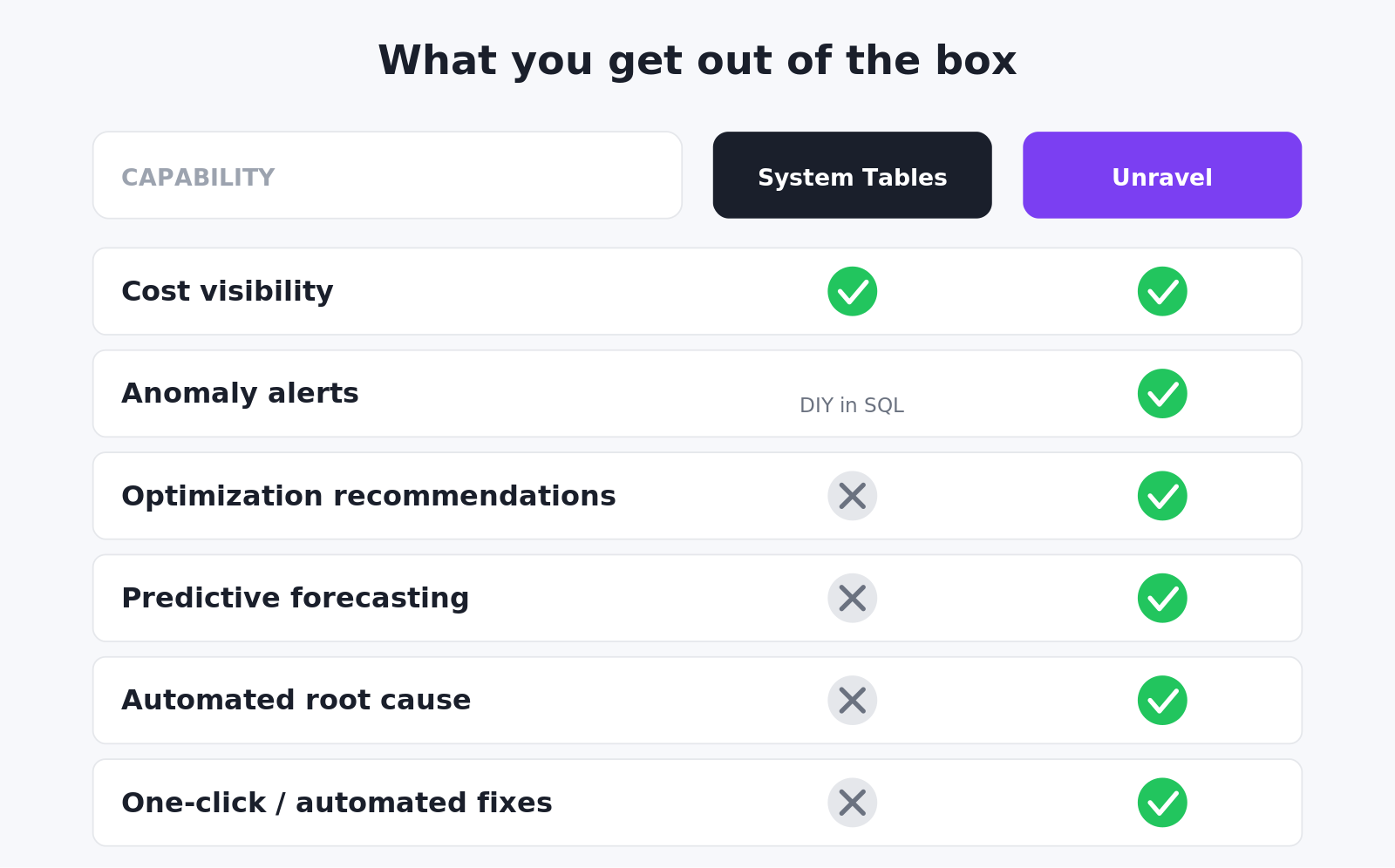
- No optimization recommendations. Dashboards show that a production cluster is at 22% utilization. They don't tell you what to do about it.
- No forecasting. You can see last month's spend; you can't see next month's overrun before it lands.
- No automated remediation. Every fix is a manual ticket, a manual config change, and a manual verification.
- Doesn't scale with the platform. A team running 3,000+ clusters cannot hand-tune each one from a SQL editor.
What Unravel Adds on Top
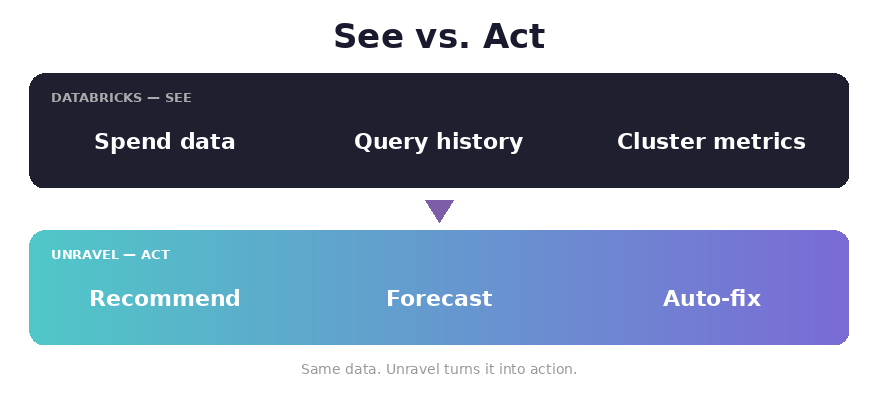
Unravel doesn't replace the system tables — it reads from them and adds an intelligence and automation layer above. The result is the same source data, but with three things the native dashboard doesn't try to do:
- AI-powered recommendations. Unravel continuously profiles every workload and produces ranked, dollar-quantified actions — "reduce workers from 20 to 8, save $4,800/month, no performance impact" — with the exact change to apply.
- Predictive forecasting and anomaly detection. ML models learn each workload's baseline. You get alerts days before a budget overruns and the moment a job's cost or duration drifts.
- AI agents that take action. Specialized agents — a Cloud FinOps Agent, an Infra Assistant, a Databricks SQL Tuner — execute approved optimizations through Databricks APIs, with policy guardrails defining what's allowed automatically versus what requires human review.
Cost attribution becomes richer too. The native dashboard groups by workspace, SKU, and user; Unravel layers business unit, project, environment, and pipeline tags on top so you can run real chargeback, not just usage reports.
A Concrete Scenario
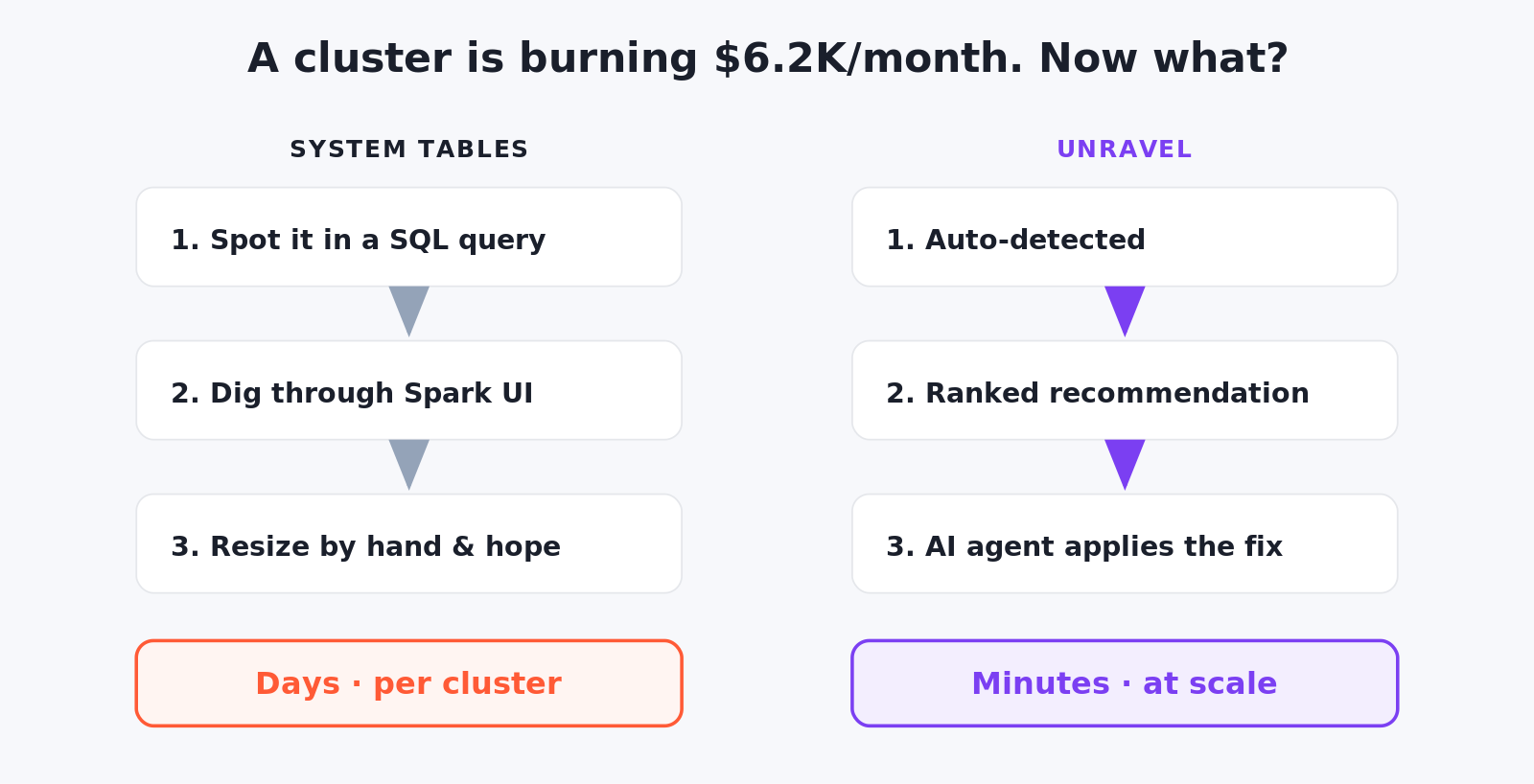
Consider an over-provisioned cluster running at 22% CPU and burning $6.2K/month. With the native dashboard, an engineer spots a spike, writes SQL to join billing.usage with compute.clusters, drops into Spark UI to inspect executors, makes a judgement call on the right size, and hopes the change doesn't break the pipeline. That's hours to days of expert time per finding — and it doesn't generalize across thousands of clusters.
With Unravel, the same situation unfolds in minutes: continuous profiling flags the inefficiency, a ranked recommendation appears with projected savings, an owner one-click approves (or policy auto-applies), the Infra Assistant resizes the cluster via the Databricks API, and the Value Realization tracker logs the savings for finance. Same data source. Very different outcome.
The Bottom Line
Databricks system tables are the right foundation for cost and usage visibility — and Unravel is built directly on that foundation. The question isn't "system tables or Unravel." It's whether the layer above them — recommendations, forecasting, attribution, automation — is something you'd rather build yourself in SQL and engineering hours, or something you'd rather have already running on day one.
Customers who pick the second path report outcomes that the dashboard alone won't get them: one global logistics firm reduced cloud data spend by 70% in six months, with a 20x ROI and 75% of their data engineers' optimization time given back. Those numbers aren't a critique of system tables — they're a measure of what sits above them.
If you're running Databricks and you'd like to see what your environment looks like through both lenses, the fastest way is a free Databricks health check. We connect to your workspace, read from the same system tables you're already collecting, and within an hour show you the ranked savings and reliability opportunities sitting in your data.
Other Useful Links
- Our Databricks Optimization Platform
- Get a Free Databricks Health Check
- Check out other Databricks Resources